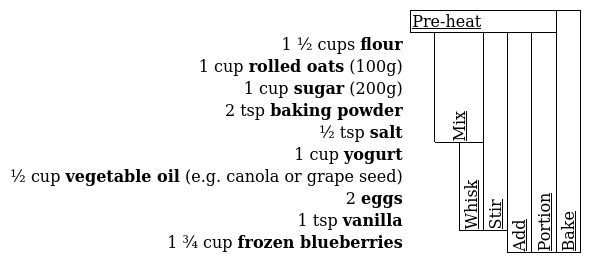
Breezipe is a human-writable XML format for recipes. Steps declare their dependencies explicitly, and Breezipe uses them to generate a summary table that makes the recipe's flow visible at a glance. Ingredient quantities are kept inline, both in the XML source and in the rendered output, no need to scroll back and forth!
The table is inspired by the recipe summaries on cookingforengineers.com:
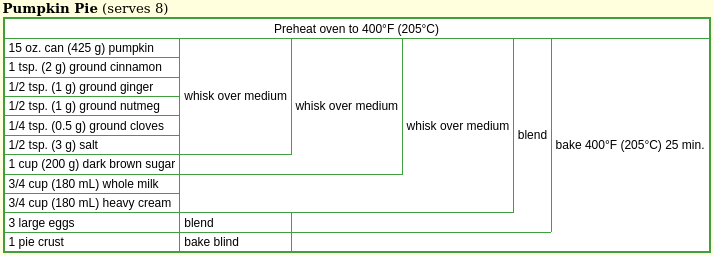
Breezipe generates this table automatically from the step definitions (see ./step-table.xsl). It differs from the CFE format in a few ways:
Temporal horizontal axis. Each column corresponds to a step index. Later steps start to the right of earlier steps, even when there is no direct dependency between them. This makes it possible to show when long steps should be done in parallel.
DAG support. Recipes are modelled as directed acyclic graphs (DAGs). When a step produces secondary outputs - a reserved portion, a stock used in multiple places - CFE represents them by splitting a cell vertically. This works only for planar graphs, and the split is placed arbitrarily, obscuring the relationship to the ingredients in the same row. Breezipe instead starts a new row for each secondary result, anchored to the same column as the step that produced it. The spatial relationship is always explicit, and the layout generalises to non-planar graphs as well.
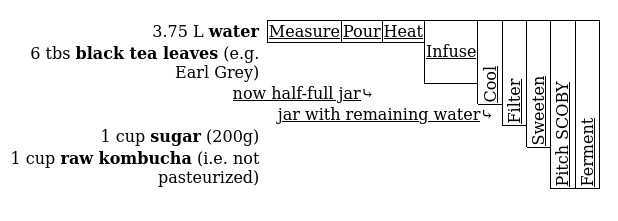
Ingredient-less steps (pre-heating an oven) systematically get a row without an ingredient header.
Vertical text in narrow cells keeps the table compact.1
A Breezipe recipe is an XML file. Each <step>
carries a short action verb (short attribute) and an
optional id for reference. Ingredients are marked up inline
with their quantities, and <ref> elements both
express the dependency on a prior step and stand in for its result in
the text. Related ingredients can be collected into a named
<group>.
Here is an excerpt from ./examples/blueberry_muffins.xml:
<?xml version="1.0" encoding="UTF-8"?>
<?xml-stylesheet type="text/xsl" href="../breezipe-xhtml.xsl"?>
<recipe xml:lang="en-CA" xmlns="http://jabarsz.cz/Breezipe" ...>

  <name>Blueberry yogurt muffins</name>

  <step id="dry" name="dry mix" short="Mix">
    Combine and mix the <group><name>dry ingredients</name>:
    <ingredient quantity="1 ½" unit="cups">flour</ingredient>,
    <ingredient quantity="1" unit="cup" note="100g">rolled
    oats</ingredient>, <ingredient quantity="1" unit="cup"
    note="200g">sugar</ingredient>, <ingredient quantity="2"
    unit="tsp">baking powder</ingredient> and <ingredient quantity="½"
    unit="tsp">salt</ingredient></group>.
  </step>

  <step id="wet" name="wet mix" short="Whisk">
    Combine and whisk the <group><name>wet ingredients</name>:
    <ingredient quantity="1" unit="cup">yogurt</ingredient>,
    <ingredient note="e.g. canola or grape seed" quantity="½"
    unit="cup">vegetable oil</ingredient>, <ingredient
    quantity="2">eggs</ingredient> and <ingredient quantity="1"
    unit="tsp">vanilla</ingredient></group>.
  </step>

  <step id="batter" short="Stir">
    Stir the <ref r="dry" /> into the <ref r="wet" />.
  </step>

  <!-- ... -->

</recipe>
See ./examples/ for complete examples.
Breezipe ships with XSLT 1.0 stylesheets that transform
.xml files to XHTML.
The <?xml-stylesheet?> processing instruction at
the top of each example file links the stylesheet directly. Open any
.xml file in a browser - most currently support XSLT,
though all major engines have signalled plans to remove it (details).
A Nix flake is provided. Enter the development shell or run targets directly:
nix develop          # shell with all build tools
nix build .#site     # build static site with rendered examples
nix run .#serve      # serve the site locally on port 8080
nix flake check      # transform and validate examples
makemake transform # transform only
make clean # remove generated files
make help # list all targets
Requirements: xsltproc (libxslt).
Validation targets require additional tools; see the Makefile or the flake.
An alternative rendering interleaves ingredient quantities with the step instructions, in the style of Joy of Cooking. It is implemented in ./joy-of-cooking-style.xsl but not wired into the default transform.
| Element | Purpose |
|---|---|
<recipe> |
Root element for a single recipe |
<recipes> |
Root for a recipe divided into sub-recipes |
<step> |
One action; id makes it referenceable by later
steps |
<ingredient> |
Inline ingredient with optional quantity,
unit, note |
<group> |
Named collection of ingredients (e.g. "dry ingredients") |
<name> |
Name of a recipe, step, or group; may contain inline XHTML |
<ref> |
Reference to a prior step or result; implies a dependency |
<result> |
Secondary output of a step, referenceable by id |
The full schema is in ./breezipe.xsd. Steps and ingredients may contain embedded XHTML for notes, links, and formatting.
XML is polarising, but the criticism usually applies to XML used as a data serialisation format, a job JSON does more cleanly. For markup - annotating words inside running text - it is harder to beat.
A recipe is, at its core, a piece of text with structure embedded in it: this word is an ingredient name, these words are a quantity, this sentence is a step. JSON and YAML have no model for that. XML does, and its extensibility means the schema can grow - for instance, Breezipe embeds XHTML directly in recipe steps for notes and links.
The other advantage is tooling: xsltproc ships with
libxslt, and XSLT is supported in browsers.
Writing the verbose
<ingredient quantity="1" unit="cup">flour</ingredient>
where Cooklang would write @flour{1%cup} is a genuine cost.
In practice, a code editor with XML support carries much of that burden.
Whether the tradeoff is worth it depends on how much you value the other
properties.
Implementing the step-ingredient table layout in XSLT 1.0 was the central programming challenge of this project. XSLT is a purely functional, tree-transformation language without mutable state or loops - which makes graph traversal and layout interesting to work out. The algorithm that positions steps on the horizontal timeline, handles non-planar graphs, and decides when to use vertical text all lives in ./step-table.xsl.
A recipe can be modelled as a directed acyclic graph: ingredients and (sub-)recipe references are leaves, steps are interior nodes, and edges represent dependencies. The last step is the root.
Most recipes are trees (each result is used exactly once), and the CFE table format handles trees well. The interesting cases are the non-tree ones: a stock used in two places, a step that splits into a used portion and a reserved one. Breezipe handles these by giving each secondary result its own row, anchored to the column of the step that produced it. A spatial relationship is preserved.
recipe_grid - a Python library generating
ingredient-step tables from a plain-text format. Also supports DAGs:
steps with multiple outputs list them within the step cell; results
referenced by multiple later steps are broken out into separate
sub-recipe tables linked by hyperlinks, trading spatial proximity for
modularity.The CFE author has tried this, but his vertical text relied on an IE-specific CSS property that the (then new!) Firefox didn't implement. He writes about it in this blog post from 2004.↩︎